

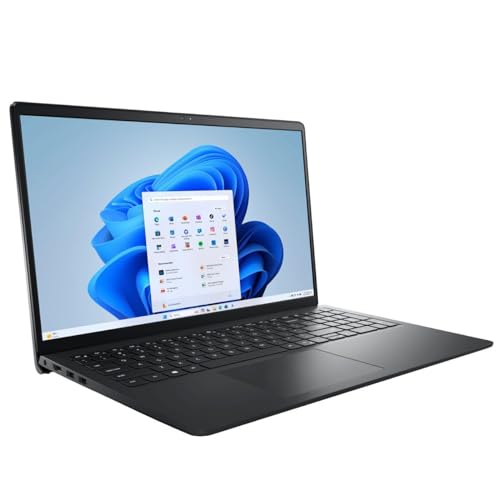




In today’s dynamic world, where technology is a cornerstone of both professional and personal life, choosing the right laptop can be a make-or-break decision. The Dell Inspiron 15 3520 Touch Laptop emerges as a strong contender for those in the quest for a balance between performance, usability, and modern design. With a robust suite of features tailored for both business and academic environments, it aims to deliver on multiple fronts. The Inspiron series has a long-standing reputation for reliability and performance, but how does the 3520 model stand up to the expectations of today’s technology-driven landscape? In this detailed review, we will take an in-depth look at its specifications, performance, design, and overall value proposition, providing you with all the insights needed to make an informed decision.
The Dell Inspiron 15 3520 Touch Laptop is powered by the 11th Gen Intel 4-Core i5-1155G7 processor, which promises dynamic processing capabilities. The quad-core, eight-way performance is enhanced by Intel’s Turbo Boost Technology, offering an extra surge of power when necessary while maintaining energy efficiency. With 32GB RAM, multitasking across demanding applications is smooth and efficient, making it ideal for both professionals and students.
One of the standout features of this laptop is its 15.6″ Full HD Touch Display, boasting a resolution of 1920 x 1080. The IPS technology ensures broad viewing angles, while the LED backlighting provides energy efficiency. This combination results in vibrant colors and enhanced clarity, perfect for media consumption and design tasks.
The Inspiron 15 3520 is elegantly designed with a contemporary aesthetic, using post-consumer recyclable plastics and waterborne paints. The lift hinge design and expanded keyboard layout improve ergonomic comfort, encouraging prolonged use without strain.
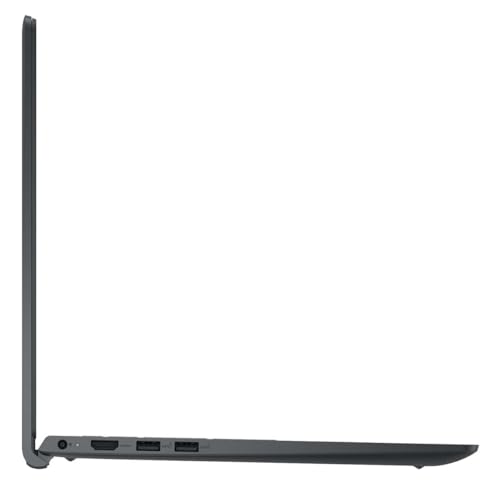
Connectivity options are plentiful, with three USB Type-A ports, an HDMI port, an SD Card Reader, and a headphone/microphone combo jack. This versatility ensures that the laptop can easily connect to various peripherals, expanding its functionality.
The Dell Inspiron 15 3520 is versatile, catering to a variety of use cases. For students, this laptop provides the power needed for research, online classes, and projects. The substantial 32GB RAM makes it capable of handling multiple applications simultaneously, from web browsers and document editors to more demanding software like Adobe Photoshop or programming environments.
In a business context, the Inspiron’s robust performance and sleek design make it suitable for professionals who need a reliable machine for presentations, remote work, and multi-tasking. The 1TB PCIe SSD ensures rapid boot times and quick access to files, crucial for productivity.
Moreover, the 720p webcam is particularly valuable for remote meetings and video conferences, delivering clear video quality even in less-than-ideal lighting conditions. This makes it a fitting choice for remote workers and digital nomads.
When comparing the Dell Inspiron 15 3520 to other laptops in the same category, such as the HP Pavilion 15 and Lenovo IdeaPad 5, several distinctions arise. Both alternatives offer similar specifications in terms of RAM and storage, but the Inspiron’s touch display and superior build quality set it apart.
While the HP Pavilion 15 also offers good performance, it lacks the touch capability that enhances user interaction. On the other hand, the Lenovo IdeaPad 5 brings a competitive edge with its aluminum finish, but it doesn’t match the Inspiron in terms of RAM capacity, making Dell’s offering more suitable for heavy multitasking.
- Pros:
- High-performance 11th Gen Intel Core i5 processor
- Large 32GB RAM for effective multitasking
- 1TB PCIe SSD for ample storage and fast data access
- Touch screen with FHD resolution and IPS technology
- Environmentally conscious design
- Multiple connectivity options
- Cons:
- 720p webcam might fall short for high-end video recording
- Limited color options, with only Carbon Black available
- Design can be a bit bulky for ultra-portable needs
The Dell Inspiron 15 3520 Touch Laptop strikes a solid balance between performance, design, and usability. For students and professionals seeking a reliable, high-performance machine, it offers an impressive package. The combination of a powerful Intel i5 processor and ample RAM ensures that the laptop is ready to tackle demanding tasks, whether it’s for academic research or complex business projects.
The touch-enabled display further enhances user experience, making navigation intuitive and engaging. Moreover, the design speaks to an environmentally conscious choice, utilizing recycled materials without compromising on aesthetics or build quality.
While the 720p webcam might not satisfy the needs of those who prioritize video quality, it remains adequate for standard video conferencing. Additionally, while more color options would be appreciated, the Carbon Black finish does impart a sleek, professional look.
In summary, the Dell Inspiron 15 3520 is a commendable choice for those in search of a laptop that combines functionality with style. It stands out as a robust option for business users and students alike, promising to deliver on both performance and longevity. Whether you’re navigating through a hectic workday or managing a busy academic schedule, this laptop is designed to be a dependable companion.
Discover more from MarkTalks on Technology, Data, Finance, Management
Subscribe to get the latest posts sent to your email.

