



No products found.
The Dell Latitude 5550 stands as a testament to how far laptop technology has come in delivering efficient and powerful computing for business professionals. With the introduction of the Intel Ultra 5 135U processor, this laptop aims to redefine performance benchmarks in its category. Designed with the modern professional in mind, it comes equipped with features that not only enhance productivity but also provide a seamless blend of power and portability. As part of Dell’s Latitude series, the 5550 model continues the brand’s legacy of reliability and innovation, offering a host of cutting-edge features such as advanced connectivity options, substantial RAM and storage, and enhanced security measures. In a world where remote work is increasingly becoming the norm, having a robust and versatile device like this is no longer a luxury but a necessity. The Dell Latitude 5550 promises to deliver on all fronts, making it an attractive proposition for both individual users and corporate environments. Let’s take a closer look at what makes this laptop a compelling choice.
- Processor: At the heart of the Dell Latitude 5550 is the Intel Core Ultra 5 135U processor. This first-generation Core Ultra processor is designed to replace the older 13th generation Core models. With 12 cores and 14 threads, it offers a significant boost in processing power, making it well-suited for multitasking and demanding applications. The performance cores can reach speeds of up to 4.4 GHz, while the efficient cores handle less demanding tasks efficiently.
- Display: The laptop features a 15.6″ Full HD (1920×1080) IPS display that provides clear and vibrant visuals. The anti-glare coating makes it ideal for use in various lighting conditions, and the 250-nit brightness ensures good visibility. The 45% NTSC color gamut may not be the best for professional designers, but it’s sufficient for regular business tasks.
- Memory and Storage: Equipped with 16GB DDR5 SDRAM and a 512GB M.2 PCIe NVMe SSD, this machine ensures speedy data access and ample storage for all your files. This combination is perfect for business users who need to run multiple applications simultaneously.
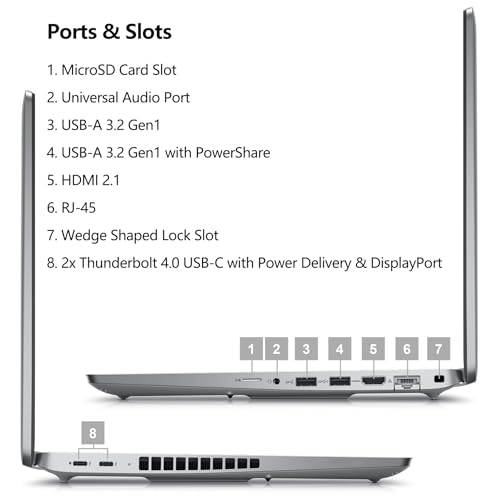
- Connectivity: The inclusion of Wi-Fi 6 and Bluetooth 5.3 ensures fast and stable wireless connections. The variety of ports, including two Thunderbolt 4 ports, USB 3.2, HDMI 2.1, and an Ethernet port, provide versatile connectivity options for all your peripherals.
- Security: With a fingerprint reader and Control Vault 3+, the Latitude 5550 offers enhanced security features that protect sensitive data and provide peace of mind for business users.
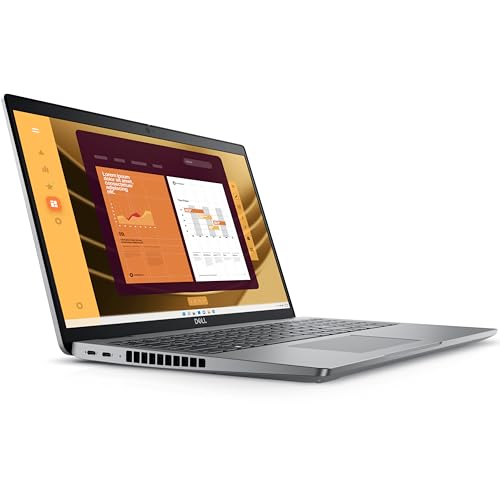
- Keyboard and Design: The laptop sports an English US backlit AI hotkey keyboard with a numeric keypad, catering to users who spend long hours typing. The overall design is sleek and professional, fitting seamlessly into any business environment.
This laptop is particularly suited for business professionals who require a reliable and powerful machine that can handle a variety of tasks. With its robust processor and extensive connectivity options, it’s perfect for running complex business applications, conducting virtual meetings, and managing multiple projects simultaneously. The security features ensure that sensitive business data is well-protected, making it a great choice for executives and employees handling confidential information. Additionally, its portability and battery efficiency make it suitable for remote work, whether you’re at home or traveling. It’s also a good fit for educators and students who need a durable and efficient device for online learning and research.
When compared to similar products in the same category, such as the Lenovo ThinkPad T15 and the HP EliteBook 850 G8, the Dell Latitude 5550 holds its ground firmly. The Lenovo ThinkPad offers comparable processing power but tends to be bulkier and heavier. The HP EliteBook, on the other hand, provides a slightly more colorful display but falls short in terms of processor performance. The Latitude 5550 strikes a balance between performance and portability, offering a more comprehensive suite of features, including modern connectivity options and robust security measures.
- Pros:
- Powerful Intel Ultra 5 135U processor.
- Ample 16GB DDR5 RAM and 512GB SSD for smooth multitasking.
- Extensive connectivity options, including Thunderbolt 4.
- Enhanced security features like fingerprint reader and Control Vault 3+.
- Professional and sleek design.
- Cons:
- 45% NTSC display may not be ideal for graphic designers.
- Pricier than some competitors.
- Non-touch display, which some users might miss.
The Dell Latitude 5550 is undeniably a powerhouse in the business laptop sector. Its advanced Intel Ultra 5 135U processor, coupled with 16GB of DDR5 RAM, ensures that you’re well-equipped to handle any task, from data-intensive applications to seamless multitasking. The inclusion of Thunderbolt 4 and a variety of other ports means you have the flexibility to connect a myriad of devices, all while enjoying fast data transfer speeds.
While the display might not cater to professional creative work, it is more than adequate for business tasks, offering clarity and anti-glare protection. The design is both sleek and functional, with a backlit keyboard that enhances usability in low-light conditions. Security is a top priority with features like the fingerprint reader and Control Vault 3+, making it an ideal choice for environments where data protection is critical.
For business professionals seeking a reliable, efficient, and secure laptop, the Dell Latitude 5550 is a commendable choice. It stands out in a crowded market by offering a balanced mix of performance, portability, and modern features. Whether you’re working from an office, home, or on the go, this laptop is equipped to meet the demands of a dynamic work environment, making it a worthy investment for those who value both performance and reliability.
Updated on 2026-04-03 at 22:55 via Amazon Associates
Discover more from MarkTalks on Technology, Data, Finance, Management
Subscribe to get the latest posts sent to your email.

