



No products found.
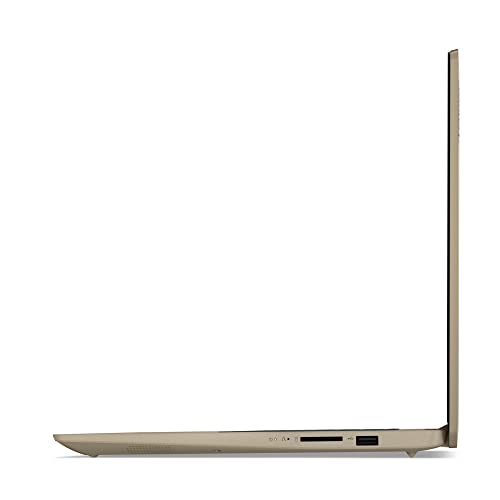
The Lenovo Ideapad 3i is a laptop that seeks to balance performance, utility, and affordability in a sleek almond-colored chassis. As part of Lenovo’s widely acclaimed Ideapad series, this laptop is designed to serve both professional and personal computing needs without breaking the bank. With a solid build, it caters to users who require reliability and performance in their day-to-day tasks. Its sizable 15.6″ Full HD touchscreen display, coupled with an 11th Gen Intel Core i3 processor, positions it as a compelling choice for those who need a laptop that can handle multiple tasks gracefully. The integration of a high-bandwidth 20GB RAM and a swift 512GB PCIe solid-state drive (SSD) ensures that this device is not just about looks but also about delivering efficient performance. Despite being on the lighter end of high-capacity laptops, it manages to pack in an impressive array of features that rival more expensive models.
At the heart of the Lenovo Ideapad 3i is its 11th Gen Intel Core i3-1115G4 processor, which, though not the most powerful in the market, offers a satisfactory performance for everyday tasks. The dual-core processor with a max turbo frequency of 4.10GHz allows for seamless operation of basic productivity applications and multimedia consumption. Coupled with Intel UHD Graphics, this laptop efficiently handles tasks ranging from simple photo editing to streaming movies.
The 15.6″ Full HD touchscreen is another highlight, providing crisp and vibrant visuals that enhance both work and entertainment experiences. The touchscreen capability is a significant benefit for those who appreciate intuitive navigation and interaction, especially when browsing or engaging with multimedia applications.
One of the standout features of this laptop is its impressive 20GB DDR4 RAM, which is a notable upgrade from the standard configurations found in other laptops in this price range. This high-bandwidth memory ensures smooth operation even when multiple applications and browser tabs are open simultaneously, offering a hassle-free multitasking experience.
Storage is another area where the Ideapad 3i shines. With its 512GB PCIe SSD, users can enjoy fast boot times and quick data access, enhancing overall productivity and user satisfaction. The combination of ample storage and speedy access makes it ideal for users who deal with large files and need efficient data management.
The Lenovo Ideapad 3i is an ideal choice for students, professionals, and casual users alike. For students, its lightweight (3.64 lbs) and slim profile (0.8″ height) make it easy to carry around campus or fit in a backpack. Its robust RAM and reliable processor mean it can handle academic tasks like research, writing papers, and creating presentations without lag.
Professionals can also benefit from the Ideapad 3i’s capabilities. Its comprehensive suite of connectivity options, including USB 3.2 Type-C and HDMI ports, ensures it can connect to various peripherals and external displays, making it suitable for presentations and collaborative work environments. The inclusion of Windows 10 Home, with a free upgrade to Windows 11, keeps you equipped with the latest features and security updates.
Casual users looking for a device for everyday use, such as browsing the web, streaming content, and light gaming, will find this laptop meets their needs with ease. The touchscreen adds an element of interactivity and convenience, especially for those accustomed to using touch-enabled devices.
When compared to similar products in the same category, like the HP Pavilion 15 or the Dell Inspiron 15, the Lenovo Ideapad 3i holds its ground with its superior RAM capacity and touchscreen functionality. The HP Pavilion 15 offers a similar processor but generally comes with lower RAM and lacks a touchscreen, which may affect multitasking efficiency and ease of use. Meanwhile, the Dell Inspiron 15 often competes with a slightly higher price tag while offering comparable performance specifications.
- Large 20GB RAM for efficient multitasking
- 512GB PCIe SSD for fast boot and quick access to data
- 15.6″ Full HD touchscreen enhances user interaction
- Lightweight and portable design
- Comprehensive connectivity options
- Processor may not suffice for high-end gaming or intensive tasks
- Integrated Intel UHD Graphics limits graphic-intensive applications
- No dedicated graphics card
The Lenovo Ideapad 3i is a versatile and affordable option for users who need a reliable laptop for everyday tasks. Its robust RAM and storage, combined with a capable processor, make it an attractive choice for students, professionals, and casual users. While it may not cater to those seeking cutting-edge performance for gaming or graphic-intensive tasks, it excels in providing a balance of performance and affordability for general use. The touchscreen feature is a significant advantage for those who enjoy the added convenience of interaction beyond the keyboard and mouse.
For anyone in the market for a mid-range laptop that delivers excellent value for money, the Lenovo Ideapad 3i should be high on the list of considerations. Its competitive pricing, coupled with the assurance of Lenovo’s brand reliability, ensures that you have a device capable of meeting daily computing needs with ease. Whether you’re a student navigating through online classes, a professional handling presentations, or a casual user enjoying a Netflix binge, the Ideapad 3i provides a reliable and pleasant experience.
Updated on 2026-04-03 at 17:19 via Amazon Associates
Discover more from MarkTalks on Technology, Data, Finance, Management
Subscribe to get the latest posts sent to your email.

