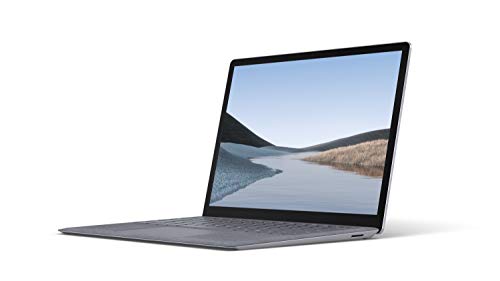
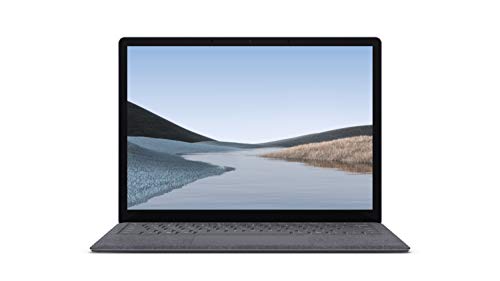
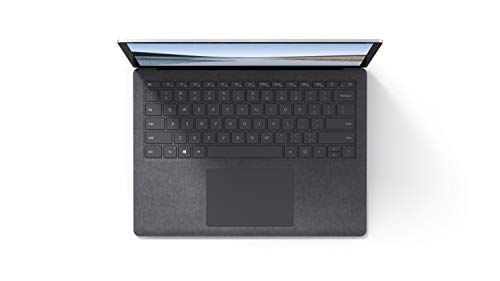


In the realm of personal computing, the Microsoft Surface series has consistently stood out for its seamless blend of power, style, and efficiency. Released on October 22, 2019, the Microsoft Surface Laptop 3 continues to uphold this tradition with its sleek 13.5-inch touch-screen and a design that’s both aesthetically pleasing and robustly functional. At first glance, the Surface Laptop 3, offered in a sophisticated Platinum shade with an Alcantara fabric keyboard, encapsulates Microsoft’s dedication to marrying form and function. Weighing just 2.79 pounds, it is designed for portability without compromising on power or performance. Whether you are a student, a professional, or an enthusiast, this laptop promises to be a reliable companion for a variety of tasks. As part of Microsoft’s promise to keep its devices future-proof, this model is ready for a free upgrade to Windows 11, enhancing both its longevity and user experience. Let’s dive deeper into the features, benefits, and overall impact of this elegant device.
- Design and Build: The Surface Laptop 3 boasts a thin and light design, measuring just 13.5 inches in screen size and weighing 2.79 pounds, making it exceptionally portable. Its Platinum color with the luxurious Alcantara keyboard adds a touch of elegance.
- Performance: Equipped with the latest Intel Core i5 processor and 8GB of memory, the Surface Laptop 3 is up to two times faster than its predecessor, the Surface Laptop 2. This makes it ideal for multitasking and handling demanding applications.
- Battery Life: With up to 11.5 hours of battery life, this laptop is built for all-day use. The fast-charging capability, which charges the battery up to 80% in about one hour, ensures you spend more time working or playing, and less time tethered to an outlet.
- Connectivity: The inclusion of both USB-C and USB-A ports allows for versatile connectivity options, whether you’re attaching displays, docking stations, or charging your accessories.
- Future-Proof with Windows 11: Microsoft offers a free upgrade to Windows 11, ensuring that the Surface Laptop 3 remains up-to-date with the latest operating system enhancements and security features.
The Microsoft Surface Laptop 3 is versatile enough to cater to a range of users. Students can benefit immensely from its portability and long battery life, making it an ideal choice for taking notes in class or completing assignments on the go. For professionals, the fast processing speed and elegant design make it suitable for presentations, multitasking between applications like Microsoft Office, and even light content creation tasks. Creative individuals might appreciate the touch-screen feature, which allows for easy sketching or note-taking. Furthermore, the laptop’s lightweight design makes it perfect for travelers or digital nomads who need to work from different locations without being bogged down by heavier devices.
When comparing the Surface Laptop 3 to similar offerings like the MacBook Air or Dell XPS 13, several distinctions emerge. The Surface Laptop 3’s touch-screen capability and inclusion of both USB-C and USB-A ports offer more flexibility than the MacBook Air, which is limited to USB-C. Meanwhile, while the Dell XPS 13 boasts superior display resolution, the Surface Laptop 3 comes out ahead with its Alcantara keyboard, which many users find more comfortable for extended typing sessions. Additionally, the fast-charging feature of the Surface Laptop 3 provides a practical advantage over many other laptops in the same category.
Pros:
- Lightweight and portable design.
- Strong performance with the latest Intel Core i5 processor.
- Excellent battery life with fast charging capability.
- Versatile connectivity options with USB-C and USB-A ports.
- Future-proof with a free upgrade to Windows 11.
Cons:
- The 128GB storage might be limited for users with extensive storage needs.
- Premium pricing could be a barrier for budget-conscious buyers.
- Lack of dedicated GPU might not suit heavy gamers or advanced multimedia creators.
The Microsoft Surface Laptop 3 stands as a strong contender in the ultrabook category, especially for users who value a balance of aesthetics and performance. Its elegant design coupled with powerful specifications makes it an attractive choice for a wide range of users, from students to professionals. The touch-screen capability and Alcantara keyboard add layers of versatility and comfort that are often overlooked in other laptops. While the storage capacity may be a limiting factor for some, cloud storage solutions can easily mitigate this concern. For those who prioritize style, portability, and future-proofing through hardware and software updates, the Surface Laptop 3 is a compelling choice. The free upgrade to Windows 11 further extends its relevance in today’s fast-evolving tech landscape. If you are willing to invest in a device that delivers reliability, performance, and a touch of luxury, this laptop deserves a spot at the top of your list.
Discover more from MarkTalks on Technology, Data, Finance, Management
Subscribe to get the latest posts sent to your email.

